
โ†
Nav Toor@heynavtoor
open on x โ†—

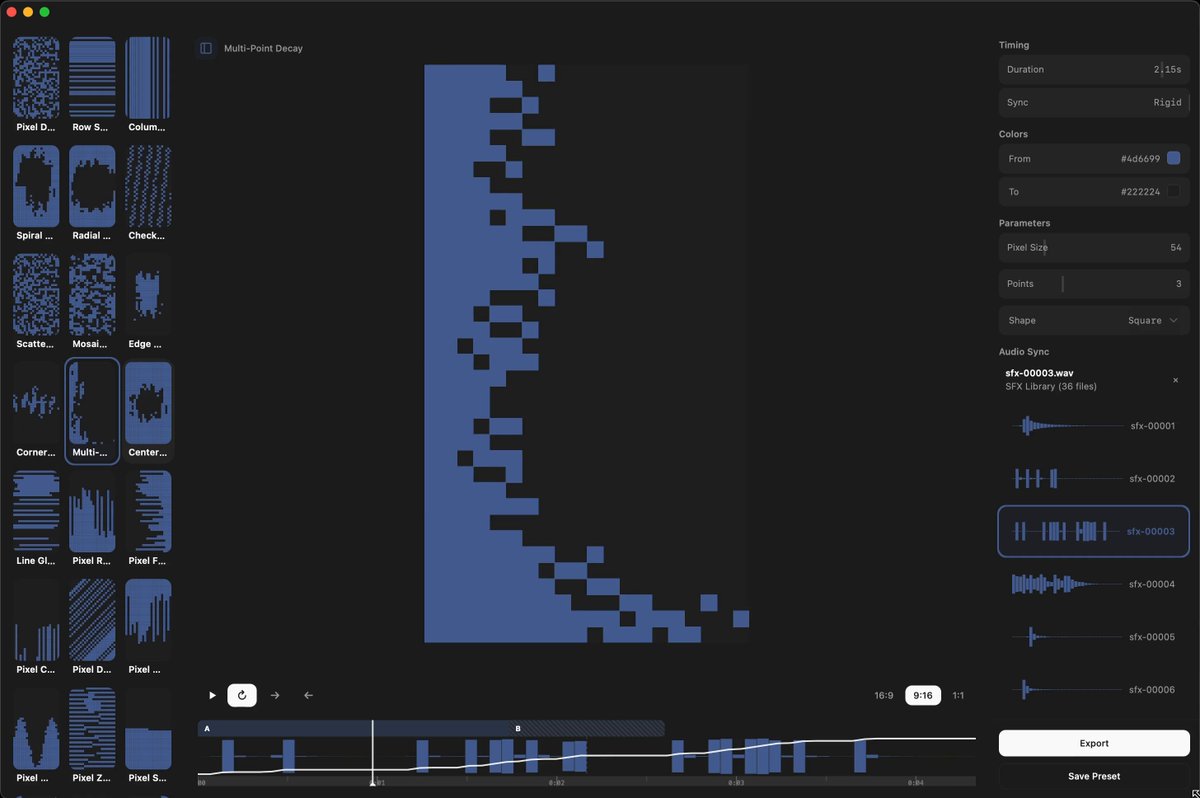
๐Ÿšจ Screen Studio charges $89 for this. Someone open sourced the entire thing for free. It's called OpenScreen. 8,400+ GitHub stars. You record your screen. It automatically transforms it into a polished, professional demo video. Auto-zoom into clicks. Smooth cursor animations. Motion blur. Custom backgrounds with wallpapers, gradients, and shadows. Webcam overlays. Annotations. Timeline editing. Export in any aspect ratio. The exact workflow that Screen Studio sells for $89 and Loom sells as a subscription. Free. No watermarks. No accounts. No subscriptions. Here's what you get out of the box: โ†’ Full screen or window capture with system audio and mic โ†’ Automatic zoom that follows your cursor and clicks โ†’ Manual zoom with customizable depth and timing โ†’ Smooth motion blur on pan and zoom transitions โ†’ Animated cursor rendering with motion effects โ†’ Webcam bubble overlay with drag-and-drop positioning โ†’ Wallpapers, solid colors, gradients, or custom backgrounds โ†’ Text and arrow annotations layered over recordings โ†’ Timeline trimming and variable speed segments โ†’ Crop, resize, and export in any resolution or aspect ratio โ†’ Save and reopen projects anytime Here's the wildest part: A developer forked it and built an even more advanced version called Recordly. Full cursor animation pipeline. Native macOS and Windows recording. Zoom behavior that mirrors Screen Studio frame-for-frame. Audio tracks. Webcam overlays with zoom-reactive scaling. Both are free. Both are MIT licensed. Both work on Windows, macOS, and Linux. Download. Record. Export. Done. 100% Open Source. MIT License. (Link in the comments)
โ™ฅ 8.5Kโ‡„ 700โ—‰ 724.8K
#open-source
#screen-recording
#video-editing
pinned 26 NOV 24ยท backfill

related

โ–ถ@toolfolioโ–ถ@stephenhaneyโ‰ก 3@dhruvtwt_โ–ถ@abouelatta_aliโ–ถ@beechinourLow-key websites I quietly rely on 1) http://roadmap.sh Gives you a brutally clear learning path for roles like frontend, backend, DevOps, etc No fluff, just โ€œlearn this โ†’ then this โ†’ then thisโ€. 2) http://playcode.io An online playground to quickly test HTML, CSS, JS without setting up anything locally Perfect for quick experiments and debugging ideas 3) http://usehooks.com A collection of reusable React hooks with real use cases Saves time and helps you avoid rewriting the same logic again and again 4) http://devhints.io Concise cheat sheets for languages, frameworks, and tools. Ideal when you forget syntax and donโ€™t want to read a 20-minute blog 5) http://jsoncrack.com Turns messy JSON into a clean visual tree Makes understanding large APIs and configs way easier than staring at raw text 6) http://realtimecolors.com Lets you generate and preview color palettes instantly Useful when you want decent UI colors without guessing or copying blindly 7) http://regex101.com Build, test, and debug regex step by step with explanations Honestly, the fastest way to stop hating regex 8) http://bundlephobia.com Shows how big an npm package really is before you install it Helps you avoid bloating your app with โ€œtinyโ€ libraries 9) http://caniuse.com Tells you which CSS/JS features actually work across browsers Essential before using shiny new features in production 10) http://toolbox.googleapps.com Googleโ€™s own diagnostics tools for DNS, email, headers, and network issues Surprisingly useful for debugging real-world problems ๐Ÿ‘‰ Which one of these do you already use and which one did you not know existed?@shekhu04โ–ถ@SynkitNETโ‰ก 3+5@realmcore_check it out -> https://nothing-to-watch.port80.ch/@proskuaaaโ–ถ@PaulSolt